
EasyPost Lowest Delivery Rate
Automatically rate-shops across all your active EasyPost carriers on every delivery order, selects the cheapest rate, updates the carrier on the picking, and logs all available rates to the chatter — so you never overpay for shipping.
Automatic Rate Shopping
On every delivery order, all active EasyPost carrier accounts are queried simultaneously. The module compares rates and selects the lowest automatically.
Dynamic Carrier Assignment
The winning carrier is automatically set on the stock picking. No manual carrier selection needed — the best rate is applied before the shipment is created.
Full Rate Logging to Chatter
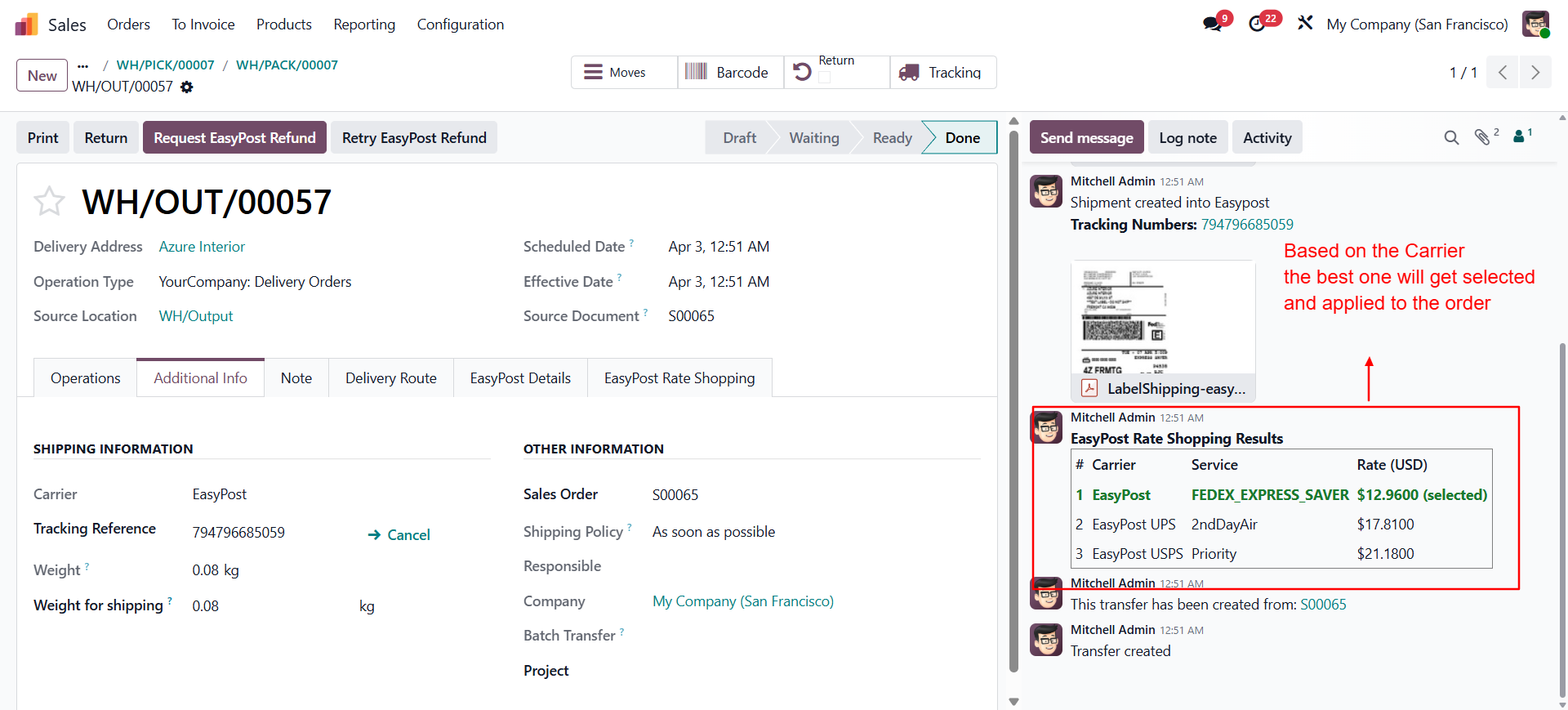
All available rates from every carrier are posted to the picking chatter. Full visibility into what each carrier would have charged for complete audit trails.
Zero Manual Work
Fully automatic — triggered on delivery order confirmation. Warehouse staff never need to compare rates or switch carriers manually.
Multi-Carrier Support
Works with all carriers available through your EasyPost account — UPS, FedEx, USPS, DHL, and any other carrier you have enabled in EasyPost.
Lightweight Integration
Depends only on stock and delivery_easypost. No extra configuration tables or UI overhead — installs and works immediately.
delivery_easypost module must be installed and your EasyPost API key configured before installing this module.-
Configure EasyPost
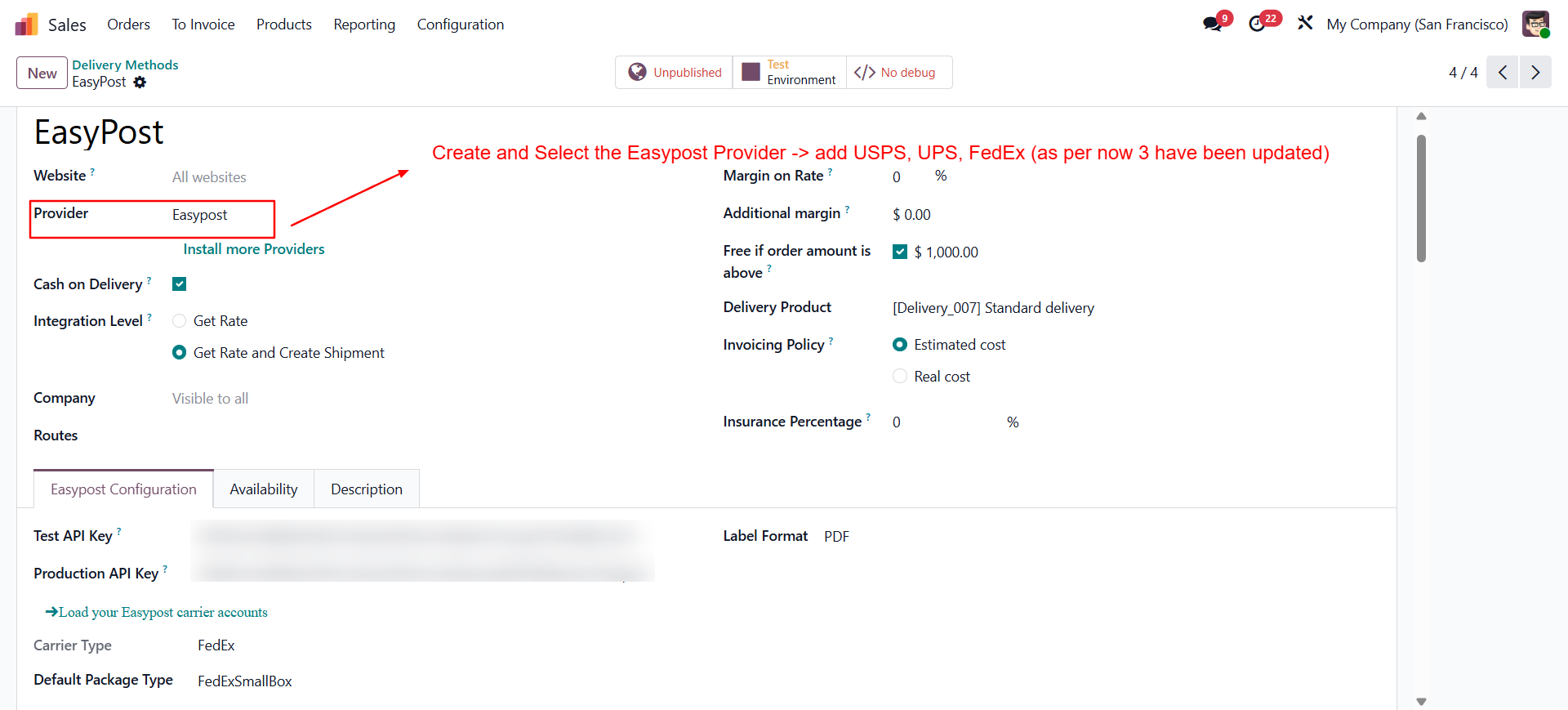
Configure the easypost settings in the sales. Go to Inventory → Configuration → Delivery Carriers. Ensure you have at least one EasyPost carrier enabled with a valid API key. Add multiple carriers (UPS, FedEx, USPS, etc.) for maximum rate comparison coverage.
-
Install This Module
Go to Apps, search for EasyPost Lowest Delivery Rate, and click Install. No additional configuration is required.
-
Verify on a Test Delivery
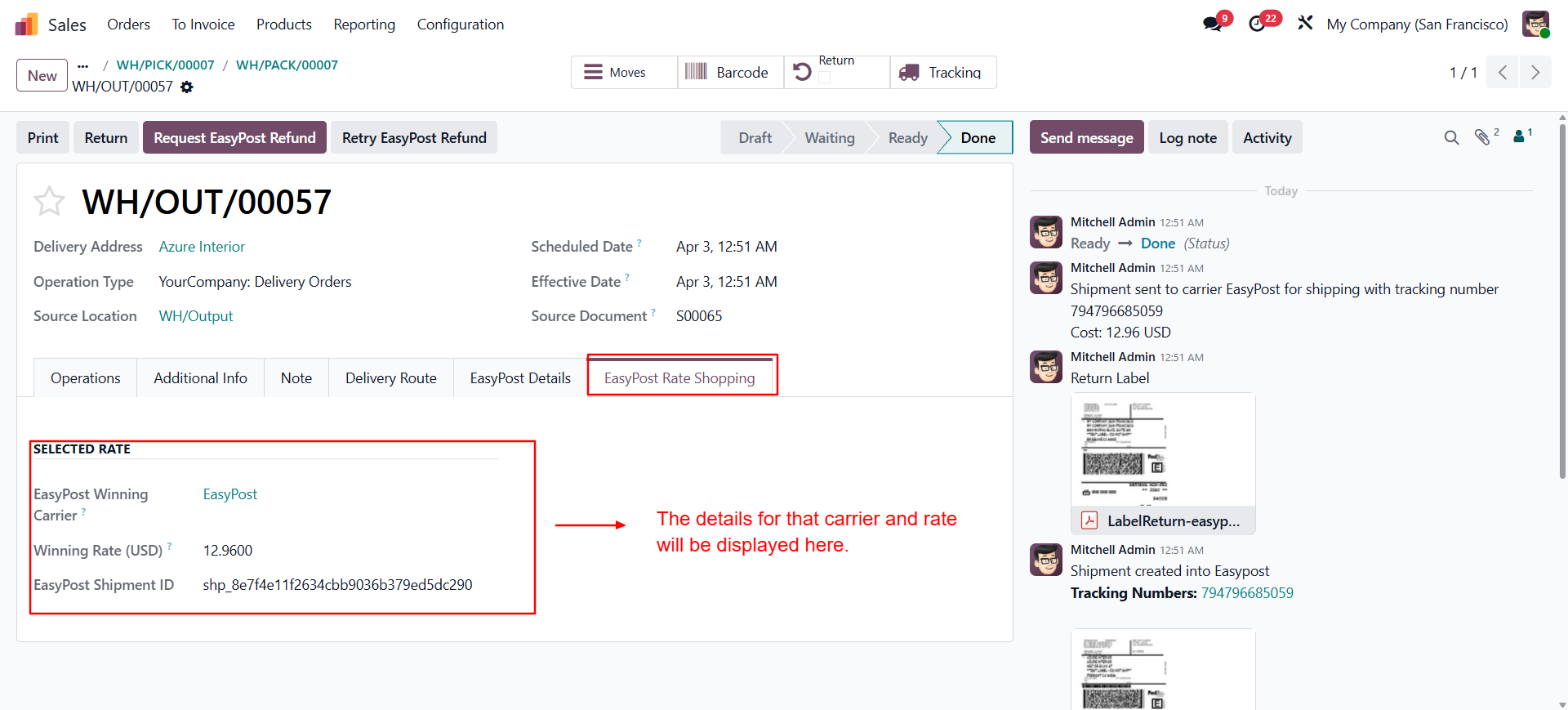
Create a test Sales Order and confirm it to generate a delivery. Validate the delivery. Check the chatter — you will see all carrier rates logged and the lowest selected automatically.
Technical Details
| Component | Detail |
|---|---|
| Trigger point | On stock.picking button action during delivery processing |
| Rate fetch | EasyPost /shipments API — all carriers queried in one call |
| Selection logic | Minimum rate amount across all returned rates |
| Carrier update | carrier_id and carrier_price fields updated on stock.picking |
| Logging | All rates posted as chatter message on the picking record |
Does this work with all EasyPost carriers?
Yes. The module queries all delivery carriers configured in Odoo that use the EasyPost provider. Any carrier enabled in your EasyPost account and added as a delivery method in Odoo will be included in the rate comparison.
What happens if EasyPost returns no rates for a carrier?
Carriers that do not return valid rates (e.g., package dimensions not supported, service unavailable for destination) are skipped silently. The lowest rate among carriers that did return rates is selected.
Can I exclude specific carriers from rate shopping?
Yes — simply set a carrier's status to Unpublished in Inventory → Configuration → Delivery Carriers. Inactive carriers are excluded from rate comparison.
Ready to Cut Your Shipping Costs?
Contact Shadail Technology to get this module installed and configured for your business today.
Contact UsEasyPost Lowest Delivery Rate
Automatically rate-shops across all your active EasyPost carriers on every delivery order, selects the cheapest rate, updates the carrier on the picking, and logs all available rates to the chatter — so you never overpay for shipping.
Automatic Rate Shopping
On every delivery order, all active EasyPost carrier accounts are queried simultaneously. The module compares rates and selects the lowest automatically.
Dynamic Carrier Assignment
The winning carrier is automatically set on the stock picking. No manual carrier selection needed — the best rate is applied before the shipment is created.
Full Rate Logging to Chatter
All available rates from every carrier are posted to the picking chatter. Full visibility into what each carrier would have charged for complete audit trails.
Zero Manual Work
Fully automatic — triggered on delivery order confirmation. Warehouse staff never need to compare rates or switch carriers manually.
Multi-Carrier Support
Works with all carriers available through your EasyPost account — UPS, FedEx, USPS, DHL, and any other carrier you have enabled in EasyPost.
Lightweight Integration
Depends only on stock and delivery_easypost. No extra configuration tables or UI overhead — installs and works immediately.
delivery_easypost module must be installed and your EasyPost API key configured before installing this module.-
Configure EasyPost
Configure the easypost settings in the sales. Go to Inventory → Configuration → Delivery Carriers. Ensure you have at least one EasyPost carrier enabled with a valid API key. Add multiple carriers (UPS, FedEx, USPS, etc.) for maximum rate comparison coverage.
-
Install This Module
Go to Apps, search for EasyPost Lowest Delivery Rate, and click Install. No additional configuration is required.
-
Verify on a Test Delivery
Create a test Sales Order and confirm it to generate a delivery. Validate the delivery. Check the chatter — you will see all carrier rates logged and the lowest selected automatically.
Technical Details
| Component | Detail |
|---|---|
| Trigger point | On stock.picking button action during delivery processing |
| Rate fetch | EasyPost /shipments API — all carriers queried in one call |
| Selection logic | Minimum rate amount across all returned rates |
| Carrier update | carrier_id and carrier_price fields updated on stock.picking |
| Logging | All rates posted as chatter message on the picking record |
Does this work with all EasyPost carriers?
Yes. The module queries all delivery carriers configured in Odoo that use the EasyPost provider. Any carrier enabled in your EasyPost account and added as a delivery method in Odoo will be included in the rate comparison.
What happens if EasyPost returns no rates for a carrier?
Carriers that do not return valid rates (e.g., package dimensions not supported, service unavailable for destination) are skipped silently. The lowest rate among carriers that did return rates is selected.
Can I exclude specific carriers from rate shopping?
Yes — simply set a carrier's status to Unpublished in Inventory → Configuration → Delivery Carriers. Inactive carriers are excluded from rate comparison.
Ready to Cut Your Shipping Costs?
Contact Shadail Technology to get this module installed and configured for your business today.
Contact Us