
EasyPost Refund on Cancel & Manual
Automate EasyPost shipment refunds on delivery cancellation, manage manual requests, enforce carrier eligibility rules, retry failed refunds, and maintain a full audit trail — all from within Odoo.
The EasyPost Refund on Cancel & Manual module provides a complete refund management solution for EasyPost shipments. It automatically initiates refunds when delivery orders are cancelled, supports manual refund requests through a confirmation wizard, applies carrier-specific eligibility rules, retries failed refunds via a scheduled job, and logs every API interaction for full traceability.
Auto Refund on Cancel
Automatically submits an EasyPost refund request whenever a validated delivery order is cancelled — zero manual steps required.
Manual Refund Wizard
The Request EasyPost Refund button on the delivery form opens a confirmation dialog for on-demand refund requests at any time.
Carrier Eligibility Checks
Per-carrier validation: USPS time window (default 30 days), UPS and FedEx toggles — each independently configurable from settings.
Automatic Retry Cron
A scheduled action retries pending or failed refunds up to a configurable maximum number of attempts at a configurable interval.
Return Label Creation
Creates a return EasyPost shipment, selects the lowest available rate, downloads the PDF label, and attaches it to the picking automatically.
Full Audit Logging
Every refund attempt — success or failure — is recorded in a dedicated log with the raw EasyPost API response and timestamps.
Chatter Notifications
Posts refund status updates directly to the delivery order chatter so the whole team stays informed in real time without leaving the record.
Centralised Settings
All behaviour controlled from Inventory → Configuration → Settings. No code changes or developer access needed.
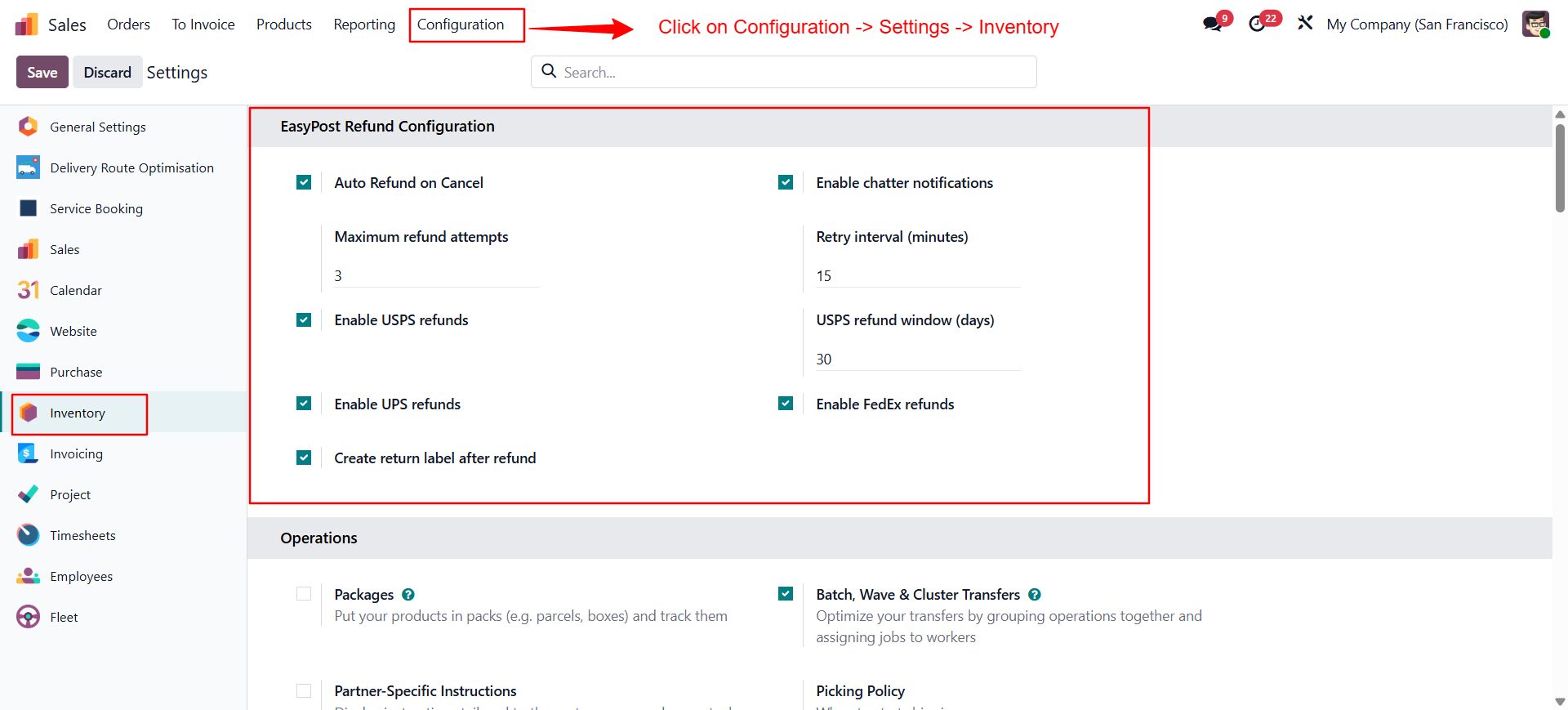
| Setting | Default | Description |
|---|---|---|
| Auto Refund on Cancel | Enabled | Triggers a refund automatically when a delivery order is cancelled. |
| Enable Chatter Notifications | Enabled | Posts refund status messages to the picking chatter on every attempt. |
| Maximum Refund Attempts | 3 | Number of times the system retries a failed refund before marking it as permanently failed. |
| Retry Interval (minutes) | 15 | Minimum time between automatic retry attempts by the scheduled cron. |
| Enable USPS Refunds | Enabled | Allow refunds for USPS shipments via EasyPost. |
| USPS Refund Window (days) | 30 | Maximum number of days after the shipment date to request a USPS refund. |
| Enable UPS Refunds | Enabled | Allow refunds for UPS shipments via EasyPost. |
| Enable FedEx Refunds | Enabled | Allow refunds for FedEx shipments via EasyPost. |
| Create Return Label After Refund | Enabled | Auto-create and attach a return label PDF to the picking when a refund succeeds. |
Refund Eligibility Flow
Carrier Setup
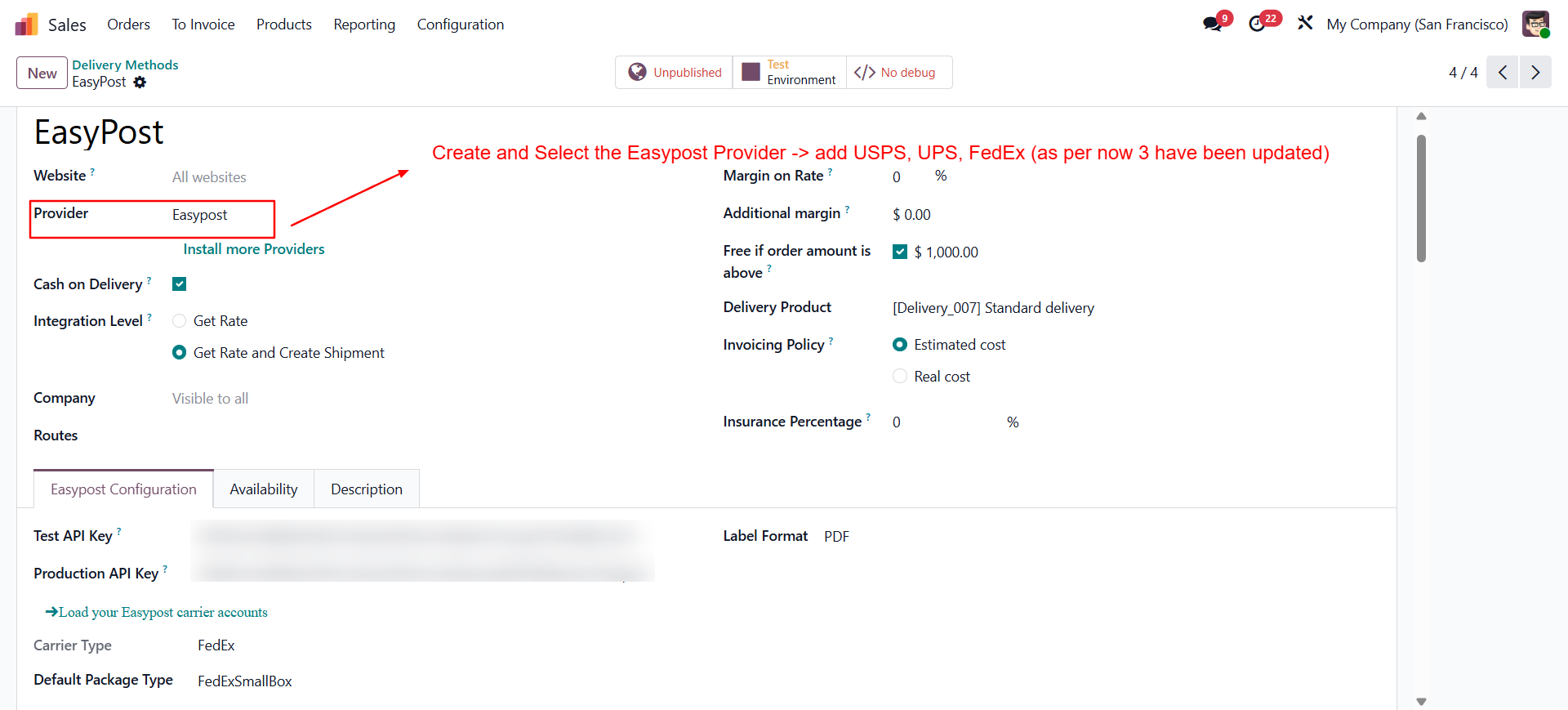
Open the EasyPost carrier
Go to Inventory → Configuration → Delivery Methods and open your EasyPost carrier record.
Set API keys
Enter your Test API Key and/or Production API Key. Enable Production Environment for live shipments.
Refund Settings
Open Inventory Settings
Go to Sales → Configuration → Settings → Inventory → EasyPost Refund Configuration.
Configure your rules
Toggle auto-refund, set maximum attempts, retry interval, and carrier-specific rules (USPS window, UPS, FedEx).
Save
Click Save to persist your configuration.
Using Auto Refund on Cancel
Open a delivery order
Go to Inventory → Operations → Transfers and open a validated outgoing delivery that has an EasyPost label.
Cancel the picking
Click Cancel. If the picking has a valid EasyPost Shipment ID (starting with
shp_), the refund is submitted automatically.Check the result
Open the EasyPost Details tab to see the refund status. The chatter shows a notification if enabled in settings.
Manual Refund Request
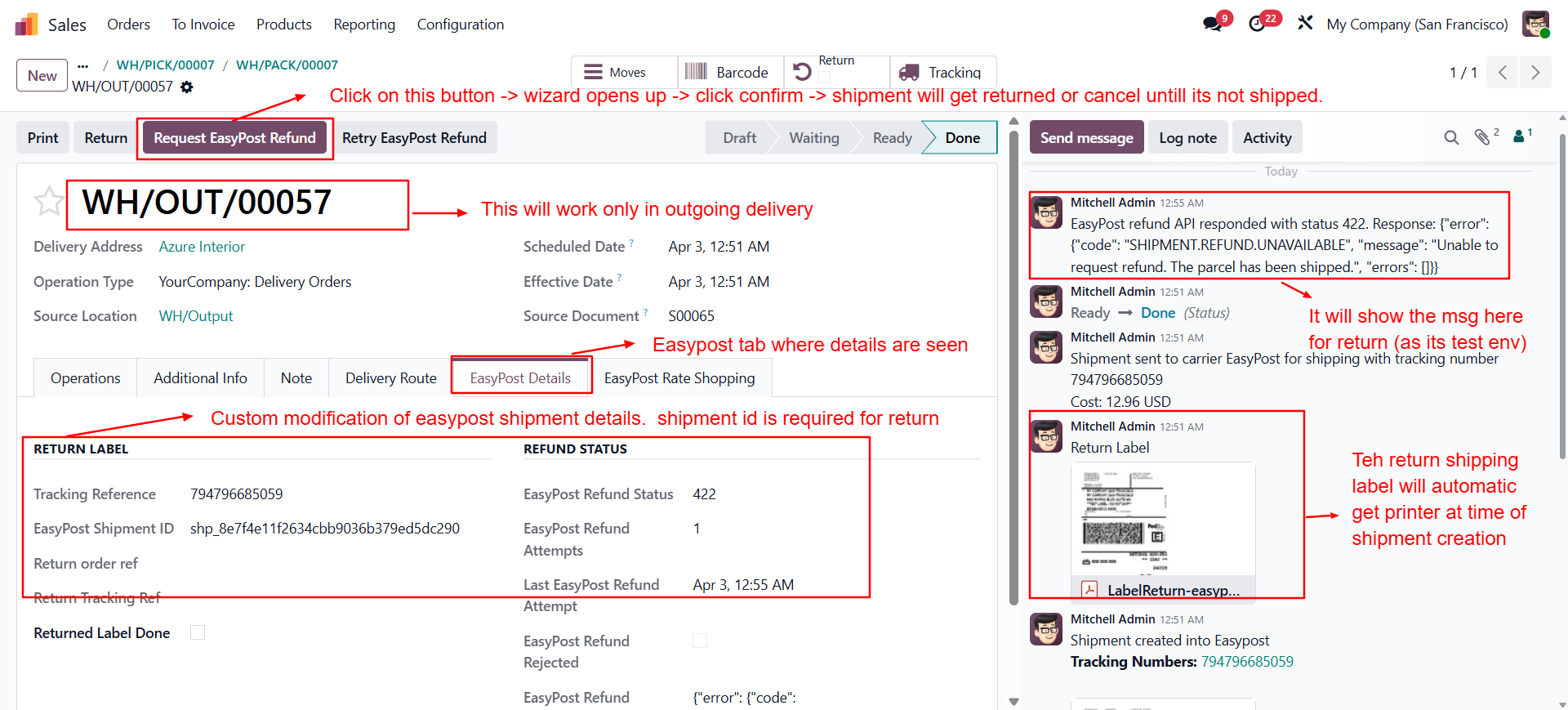
Open a shipped delivery
Navigate to the outgoing delivery order that has an EasyPost label assigned (shipment ID starting with
shp_).Click Request EasyPost Refund
Use the Request EasyPost Refund button in the header toolbar and confirm the dialog that appears.
Monitor status
The EasyPost Details tab updates with the refund status, attempt count, and any messages returned by the API.
Enable the Retry Cron
Find the scheduled action
Go to Settings → Technical → Scheduled Actions and find Retry EasyPost Refunds.
Enable and configure
Toggle it active and set your preferred interval (default: every 15 minutes). The cron retries all pending pickings up to the configured maximum attempts.
View Refund Logs
Navigate to logs
Go to Inventory → Reporting → EasyPost → Refund Logs.
Review entries
Each row shows the delivery, EasyPost shipment ID, refund status, message, and full API response for audit and dispute purposes.
Module Dependencies
| Module | Purpose |
|---|---|
stock | Odoo Inventory & Stock operations — base for stock picking model |
stock_delivery | Delivery carrier integration — carrier field on pickings |
delivery_easypost | EasyPost API keys, shipment creation, and easypost_shipment_id field |
easypost_shipment_id) on the delivery order must be populated and start with shp_ for the refund flow to trigger. This is set automatically by the delivery_easypost module when a shipment label is purchased.Key Models & Fields
| Model | Field / Extension | Purpose |
|---|---|---|
stock.picking | easypost_refund_status | Current refund state: pending / submitted / refunded / failed |
stock.picking | easypost_refund_attempts | Number of refund attempts made so far |
stock.picking | easypost_refund_message | Last message or error returned by the EasyPost API |
easypost.refund.log | Full model | Audit log: delivery, shipment ID, status, API response, timestamp |
easypost.refund.wizard | Transient model | Confirmation dialog for manual refund requests |
res.config.settings | Extended | All EasyPost refund configuration toggles and values |
Scheduled Action
Module Info
| Property | Value |
|---|---|
| Technical Name | shd_easypost_refund_on_cancel |
| Version | 19.0.1.0.0 |
| Category | Warehouse |
| License | OPL-1 |
| Author | Shadail Technology |
| Website | https://shadailtech.com |
| Odoo Version | 19 |
| Edition | Enterprise Only |
Need Help with Your EasyPost Refund Setup?
Our Odoo logistics and delivery integration team at Shadail Technology is ready to assist with configuration, carrier setup, and customisation.
Contact UsEasyPost Refund on Cancel & Manual
Automate EasyPost shipment refunds on delivery cancellation, manage manual requests, enforce carrier eligibility rules, retry failed refunds, and maintain a full audit trail — all from within Odoo.
The EasyPost Refund on Cancel & Manual module provides a complete refund management solution for EasyPost shipments. It automatically initiates refunds when delivery orders are cancelled, supports manual refund requests through a confirmation wizard, applies carrier-specific eligibility rules, retries failed refunds via a scheduled job, and logs every API interaction for full traceability.
Auto Refund on Cancel
Automatically submits an EasyPost refund request whenever a validated delivery order is cancelled — zero manual steps required.
Manual Refund Wizard
The Request EasyPost Refund button on the delivery form opens a confirmation dialog for on-demand refund requests at any time.
Carrier Eligibility Checks
Per-carrier validation: USPS time window (default 30 days), UPS and FedEx toggles — each independently configurable from settings.
Automatic Retry Cron
A scheduled action retries pending or failed refunds up to a configurable maximum number of attempts at a configurable interval.
Return Label Creation
Creates a return EasyPost shipment, selects the lowest available rate, downloads the PDF label, and attaches it to the picking automatically.
Full Audit Logging
Every refund attempt — success or failure — is recorded in a dedicated log with the raw EasyPost API response and timestamps.
Chatter Notifications
Posts refund status updates directly to the delivery order chatter so the whole team stays informed in real time without leaving the record.
Centralised Settings
All behaviour controlled from Inventory → Configuration → Settings. No code changes or developer access needed.
| Setting | Default | Description |
|---|---|---|
| Auto Refund on Cancel | Enabled | Triggers a refund automatically when a delivery order is cancelled. |
| Enable Chatter Notifications | Enabled | Posts refund status messages to the picking chatter on every attempt. |
| Maximum Refund Attempts | 3 | Number of times the system retries a failed refund before marking it as permanently failed. |
| Retry Interval (minutes) | 15 | Minimum time between automatic retry attempts by the scheduled cron. |
| Enable USPS Refunds | Enabled | Allow refunds for USPS shipments via EasyPost. |
| USPS Refund Window (days) | 30 | Maximum number of days after the shipment date to request a USPS refund. |
| Enable UPS Refunds | Enabled | Allow refunds for UPS shipments via EasyPost. |
| Enable FedEx Refunds | Enabled | Allow refunds for FedEx shipments via EasyPost. |
| Create Return Label After Refund | Enabled | Auto-create and attach a return label PDF to the picking when a refund succeeds. |
Refund Eligibility Flow
Carrier Setup
Open the EasyPost carrier
Go to Inventory → Configuration → Delivery Methods and open your EasyPost carrier record.
Set API keys
Enter your Test API Key and/or Production API Key. Enable Production Environment for live shipments.
Refund Settings
Open Inventory Settings
Go to Sales → Configuration → Settings → Inventory → EasyPost Refund Configuration.
Configure your rules
Toggle auto-refund, set maximum attempts, retry interval, and carrier-specific rules (USPS window, UPS, FedEx).
Save
Click Save to persist your configuration.
Using Auto Refund on Cancel
Open a delivery order
Go to Inventory → Operations → Transfers and open a validated outgoing delivery that has an EasyPost label.
Cancel the picking
Click Cancel. If the picking has a valid EasyPost Shipment ID (starting with
shp_), the refund is submitted automatically.Check the result
Open the EasyPost Details tab to see the refund status. The chatter shows a notification if enabled in settings.
Manual Refund Request
Open a shipped delivery
Navigate to the outgoing delivery order that has an EasyPost label assigned (shipment ID starting with
shp_).Click Request EasyPost Refund
Use the Request EasyPost Refund button in the header toolbar and confirm the dialog that appears.
Monitor status
The EasyPost Details tab updates with the refund status, attempt count, and any messages returned by the API.
Enable the Retry Cron
Find the scheduled action
Go to Settings → Technical → Scheduled Actions and find Retry EasyPost Refunds.
Enable and configure
Toggle it active and set your preferred interval (default: every 15 minutes). The cron retries all pending pickings up to the configured maximum attempts.
View Refund Logs
Navigate to logs
Go to Inventory → Reporting → EasyPost → Refund Logs.
Review entries
Each row shows the delivery, EasyPost shipment ID, refund status, message, and full API response for audit and dispute purposes.
Module Dependencies
| Module | Purpose |
|---|---|
stock | Odoo Inventory & Stock operations — base for stock picking model |
stock_delivery | Delivery carrier integration — carrier field on pickings |
delivery_easypost | EasyPost API keys, shipment creation, and easypost_shipment_id field |
easypost_shipment_id) on the delivery order must be populated and start with shp_ for the refund flow to trigger. This is set automatically by the delivery_easypost module when a shipment label is purchased.Key Models & Fields
| Model | Field / Extension | Purpose |
|---|---|---|
stock.picking | easypost_refund_status | Current refund state: pending / submitted / refunded / failed |
stock.picking | easypost_refund_attempts | Number of refund attempts made so far |
stock.picking | easypost_refund_message | Last message or error returned by the EasyPost API |
easypost.refund.log | Full model | Audit log: delivery, shipment ID, status, API response, timestamp |
easypost.refund.wizard | Transient model | Confirmation dialog for manual refund requests |
res.config.settings | Extended | All EasyPost refund configuration toggles and values |
Scheduled Action
Module Info
| Property | Value |
|---|---|
| Technical Name | shd_easypost_refund_on_cancel |
| Version | 19.0.1.0.0 |
| Category | Warehouse |
| License | OPL-1 |
| Author | Shadail Technology |
| Website | https://shadailtech.com |
| Odoo Version | 19 |
| Edition | Enterprise Only |
Need Help with Your EasyPost Refund Setup?
Our Odoo logistics and delivery integration team at Shadail Technology is ready to assist with configuration, carrier setup, and customisation.
Contact Us